






- Find the best broker for your trading needs
- Compare spreads, fees, and platforms
- Read in-depth reviews and analysis

Page Navigation


Select a different country or region to view content tailored to your location.

FxScouts helps traders across the globe by meticulously testing and reviewing online brokers and providing Forex education and market analysis. Our partners compensate us through paid advertising. While partners may pay to provide offers or be featured, they cannot pay to alter our recommendations, advice, ratings, or any other content. Our content and research teams do not participate in any advertising planning nor are they permitted access to advertising campaign data. For more detailed information click this link.

Stefan is a financial writer and Forex trading enthusiast with over a decade of experience in finance and technology. His interest in geopolitics, big data, and market sentiment drives his analysis of global market trends, with unbiased, well-researched content to help traders navigate the markets confidently.

Stefan is a financial writer and Forex trading enthusiast with over a decade of experience in finance and technology. His interest in geopolitics, big data, and market sentiment drives his analysis of global market trends, with unbiased, well-researched content to help traders navigate the markets confidently.
Chris manages the relationships with our partners to provide the best Forex trading experience possible for our users. Chris has 15+ years of research, and editorial and design experience for political and financial publications. His background has given him a deep understanding of international financial markets and the geopolitics that affect them.
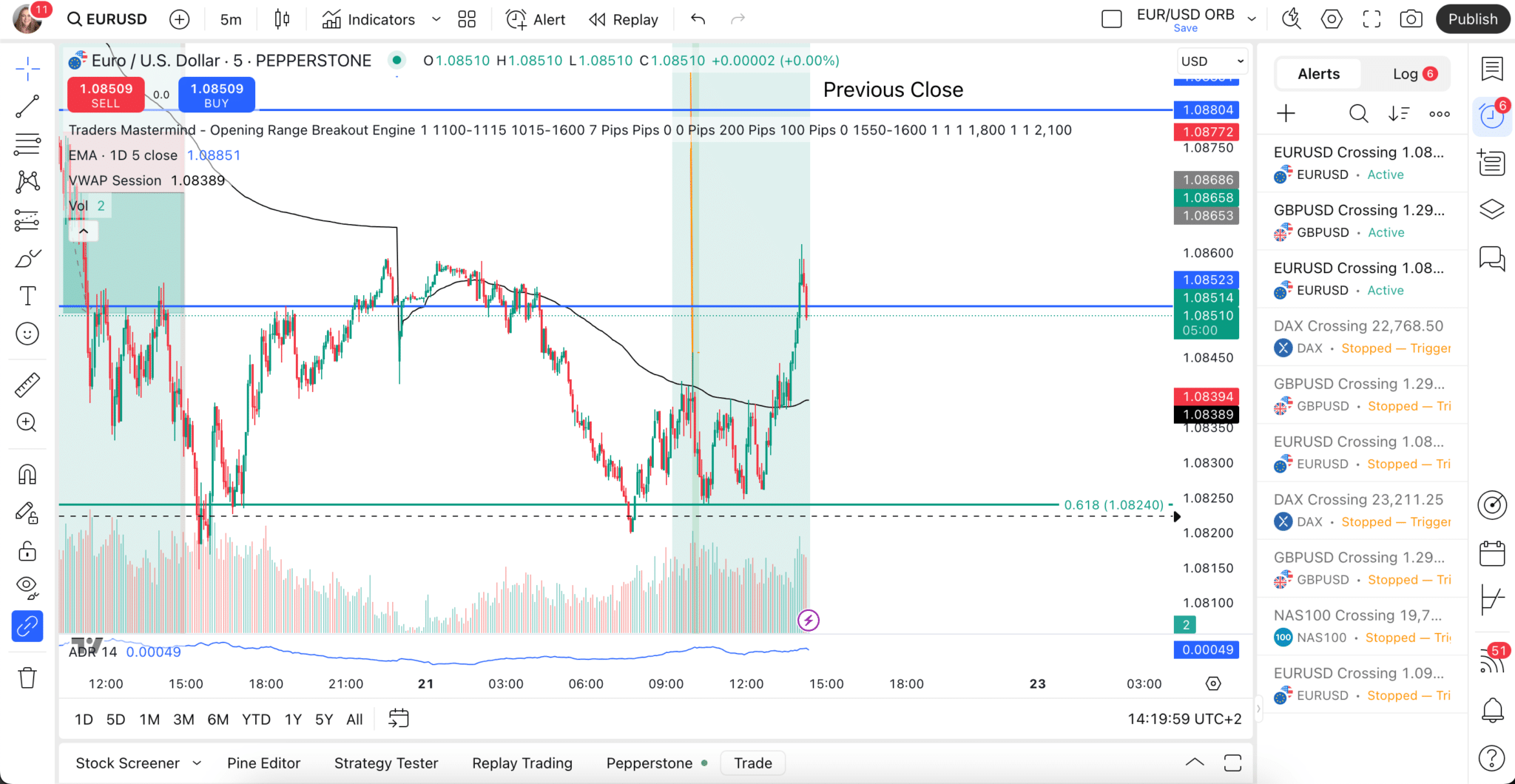
TradingView is one of the most advanced charting platforms and social trading networks available today, with over 50 million traders and investors worldwide. Originally launched as a simple browser-based charting tool, it has evolved into a global leader for traders seeking powerful analytics, intuitive design, and a vibrant trading community.
Because TradingView is not a broker itself, traders can only execute trades by connecting their accounts to a regulated Forex broker that supports TradingView integration. This guide provides a complete overview of TradingView, explains how it works, and lists the best TradingView-compatible brokers for 2026 — all tested and reviewed by our experts.
Trusted. Transparent. Tested.
For over a decade, we’ve set the standard in forex broker reviews—collecting thousands of data points yearly to deliver unbiased, expert-backed insights.
Skip the trial and error! Below, you’ll find the best forex brokers for Australian traders for 2026—thoroughly tested, verified, and ranked, so you can trade with confidence.

Swipe to scroll
Broker | Official Site | Trading View | International Regulators | Beginner Friendly | Cost of Trading Total trading cost at the time of last update, for 1 lot of EUR/USD using the account with the lowest minimum deposit. Includes spread and commission. | EUR/USD - Standard Spread This is the spread on EUR/USD using the account with the smallest deposit requirements. | EUR/USD - Raw Spread EURUSD spread on account with best pricing available for pro traders. | Compare | ||
|---|---|---|---|---|---|---|---|---|---|---|
 | Yes | AUD 100 |      | Excellent | USD 6 | 0.00 pips | 0 pips | |||
 | Yes | AUD 100 |      | Excellent | USD 10 | 1.00 pips | 0.10 pips | |||
 | Yes | USD 0 |  | Excellent | USD 8 | 0.80 pips | 0.18 pips | |||
 | Yes | AUD 100 | | Excellent | USD 10 | 1.00 pips | 0.06 pips | |||
 | Yes | AUD 50 | | Excellent | USD 3 | 0.30 pips | 0.30 pips | |||
 | Yes | AUD 0 |  | Excellent | USD 4.50 | 0.00 pips | 0 pips |







Select another broker to another broker to compare features, fees, and platforms side by side.
Find Your Ideal Forex Broker
Select another broker to another broker to compare features, fees, and platforms side by side.
0.0 pips
CMA, FSA-Seychelles, FSC, FSCA, ASIC
AUD 100
cTrader, MT4, TradingView, MT5, IRESS
30:1
FP Markets allows seamless order execution directly from TradingView charts, eliminating the need to switch platforms.
Spreads start from 0.0 pips with raw liquidity sourced from top-tier banks, ideal for scalpers and day traders.
Supports MT4, MT5, cTrader and TradingView — rare among brokers, offering flexibility for technical traders.
FP Markets is ASIC-regulated (AFSL No. 286354), offering high transparency, segregated accounts, and local dispute resolution.
Compared to MT5, the TradingView asset list is narrower — fewer stock CFDs and commodities available.
While charts are integrated, traders can’t engage with TradingView’s social feed or idea publishing within the FP Markets portal.
FP Markets | Best For: Traders seeking tight spreads with direct TradingView integration and ASIC regulation.

FxScouts
 YouTube
Select another broker to another broker to compare features, fees, and platforms side by side.
0.0 pips
CMA, BaFin, SCB, DFSA, ASIC, CySEC, FCA
AUD 100
Pepperstone Platform, cTrader, MT4, TradingView, MT5
30:1
Place, modify, and close orders directly from TradingView charts — seamlessly integrated and responsive.
Offers raw spreads from 0.0 pips and as low as AUD $3.50 per lot commission — ideal for scalpers and algorithmic traders.
No extra cost for TradingView integration — traders can chart and trade with their free or Pro TradingView subscription.
Strict regulation under ASIC and local office presence ensures legal recourse and financial protections for Australian traders.
Compared to brokers like IG, the equity CFD range is lean — focused more on FX, indices, and commodities.
Traders can’t directly share annotated charts from TradingView within the Pepperstone dashboard environment.
Pepperstone | Best For: High-frequency and technical traders looking for best-in-class TradingView execution with ultra-low latency.
FxScouts
YouTube
Select another broker to another broker to compare features, fees, and platforms side by side.
0.1 pips
FMA, FSA-Seychelles
USD 0
cTrader, MT4, TradingView, MT5
500:1
Allows live execution from TradingView with routing through ECN liquidity pools — strong depth for volume traders.
Offers among the highest leverage globally on TradingView accounts — attractive to aggressive or high-frequency traders.
Eligible clients can run EAs or third-party automation on dedicated servers with minimal latency.
No capital barrier to entry for new traders exploring TradingView as a primary platform.
Registered in New Zealand and not regulated locally by ASIC — may be a concern for compliance-sensitive traders.
Client dashboard and back-office features are less refined compared to major Australian competitors.
Select another broker to another broker to compare features, fees, and platforms side by side.
0 pips
SCB, ASIC, CySEC, FCA
AUD 100
MT4, TradingView, MT5
30:1
Over 80 crypto CFDs available to trade directly via TradingView — more than most Australian-regulated brokers.
Eightcap connects with TradingView through API bridging — allowing real-time sync between chart and execution.
Standard account offers commission-free spreads, while Raw accounts maintain 0.0 pip pricing and low fees.
Eightcap Pty Ltd is regulated by ASIC (AFSL 391441) and has gained trust among Australian crypto CFD traders.
Some users report lag in real-time syncing between TradingView signals and Eightcap execution.
While commission-free, spreads are higher on average compared to raw accounts — less ideal for scalpers.
Select another broker to another broker to compare features, fees, and platforms side by side.
0.6 pips
BaFin, ASIC, CySEC, FCA
AUD 50
MT4, TradingView, TradeStation
30:1
FXCM is an official TradingView broker — trades can be placed directly on TradingView with no bridging required.
Minimum deposit of just $50 makes it accessible to beginners testing strategies or chart-based trading.
Offers Forex and crypto baskets on TradingView, allowing traders to speculate on broader themes (e.g., USD strength).
Includes webinars, market insights, and TradingView tutorial content, especially for new retail traders.
Operates on a dealing desk basis — not suitable for traders looking for ECN execution and deeper market liquidity.
Crypto CFDs aren’t available 24/7 — which may frustrate those used to round-the-clock TradingView tracking.
Select another broker to another broker to compare features, fees, and platforms side by side.


TradingView has become the industry standard for traders who demand more from their platform — more powerful charting tools, deeper analysis features, and a community of millions sharing live trading ideas.
Founded in 2011 by Denis Globa, Constantin Ivanov, and Stan Bokov, TradingView began as a charting application with built-in social features, allowing traders to share insights and learn from one another.
Today, it is a full-featured, cloud-based platform used for charting, strategy testing, and trading across multiple financial markets — including forex, stocks, crypto, and indices.
Powerful charting tools:
TradingView’s charts are among the best in the industry — fast, customisable, and equipped with hundreds of indicators, timeframes, and templates.
Comprehensive analysis features:
Traders can access both technical and fundamental data, overlay multiple instruments, and build custom scripts or indicators using Pine Script.
Community interaction:
TradingView is also a social network for traders. Users can publish trade ideas, follow others, ask questions, and collaborate. This community aspect makes TradingView unique among charting platforms.
Multi-asset tracking and trading:
Beyond charting, users can analyse and trade forex, shares, crypto, and other derivatives. Once connected to a supported broker, they can execute trades directly from TradingView charts.
Cross-platform accessibility:
TradingView runs smoothly on web browsers, desktop software, and mobile apps, providing traders with complete flexibility across devices.
Custom alerts and automation:
Users can create real-time alerts based on price, volume, or indicator conditions, making it easier to react quickly to market moves.
Expanding broker support:
Each year, more brokers integrate with TradingView — reflecting the platform’s growing popularity among retail traders.
Trading hours and available markets depend on your broker’s offerings and the instruments you trade.
TradingView offers a range of options — from a free Basic plan to several paid tiers (Pro, Pro+, and Premium) designed for active and professional traders.
For a full breakdown of features and pricing, visit TradingView’s official website to compare plans.
While TradingView outperforms many competitors in functionality and usability, there are a few limitations to consider:
Although both TradingView and Autochartist offer charting and analytical tools, they serve different purposes.
Autochartist is an automated pattern-recognition plugin most commonly bundled with a broker’s platform. It scans markets and highlights trade setups, but it’s purely analytical — trades must still be placed manually via your broker’s platform.
TradingView, by contrast, is a complete trading environment. You can chart, analyse, and execute trades directlythrough the platform, provided your broker supports TradingView integration.
Direct trade execution – Open and close trades straight from the chart.
Active trader community – Share ideas, follow other traders, and interact in real time.
Extensive customisation – Build, publish, or tweak your own indicators using Pine Script.
While Autochartist remains a strong supplemental tool, TradingView combines analysis and execution — making it a more powerful and versatile platform for active traders.


Here, we’ve compiled answers to the most common questions traders have about TradingView.
TradingView is a powerful charting and social platform for traders at all levels. It allows market analysis, backtesting, and strategy sharing but does not operate as a broker. To trade directly, users must link a supported broker to their TradingView account.
In our experience, paper trading on TradingView is similar to trading on a demo account on other platforms – it allows you to simulate trading in the financial markets without risking real money. Here’s how to get started with paper trading on TradingView:
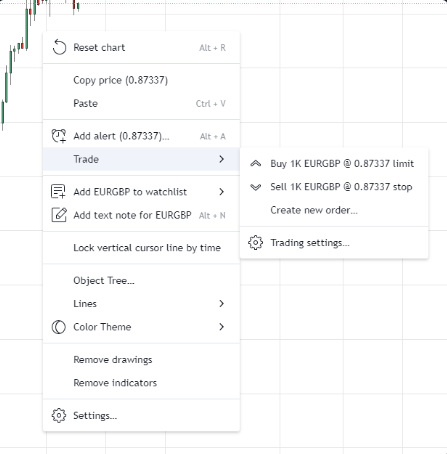
Remember, while paper trading on TradingView simulates actual market conditions, there are differences in emotion, psychology, and market dynamics when trading with real money. Paper trading is an excellent educational tool, but it’s essential to understand these differences before transitioning to live trading.
Yes. The TradingView app for Android and iOS offers full charting, analysis, and trade management, allowing traders to stay connected wherever they are.
TradingView’s Help Center, blog, and community forum are excellent resources for tutorials, walkthroughs, and user-generated tips.
Click your profile name in the top-left corner of the chart. From the drop-down menu, toggle Dark Mode to switch to the dark interface.
Curious about the latest in forex? You’re not alone. Many traders and investors are digging deeper into these topics to refine their strategies and understanding. Here’s a curated selection of “others also viewed” articles, offering a range of perspectives and insights that could prove valuable for your own forex journey.

Good Forex brokers for beginners will help their clients get started. These are the best Forex brokers for beginners in Australia for 2026.

Which broker offers the lowest spreads? We compare Forex spreads across 160+ regulated Forex brokers accepting Australian clients using the latest data.

Find the best brokers for trading the VIX, offering precise execution, low fees, and advanced tools to capitalise on market volatility.
60-90% of retail traders lose money trading Forex and CFDs. You should consider whether you understand how CFDs and leveraged trading work and if you can afford the high risk of losing your money. We may receive compensation when you click on links to products we review. Please read our advertising disclosure. By using this website, you agree to our Terms of Service.
Partner Manager and Financial Writer
Head of Content

Financial Writer


Welcome to the FxScouts community! We’re thrilled to have you on board. You’ve successfully signed up for our forex newsletter, where you’ll receive expert insights, market analysis, and the latest news straight to your inbox.
Get ready to stay ahead of the curve with our regular updates designed to help you make informed trading decisions.
Happy trading!
The FxScouts Team