Compare Forex Brokers!
Compare top Forex brokers side-by-side and find the best fit for your trading needs. Start your comparison now!
Alison Heyerdahl
Edited by
Author
Alison Heyerdahl
Edited by
Alison Heyerdahl
Head of Content

<p>Alison Heyerdahl is the Head of Content at FxScouts, a Chartered Market Technician (CMT), and an experienced trader, as well as a financial writer with extensive expertise in Forex trading, broker analysis, and market research. She has reviewed 100+ brokers, publishes weekly YouTube trading videos, and co-hosts the “Let’s Talk Forex” podcast.</p>

Learn more about Alison Heyerdahl
Author
Author
Chris Cammack
Partner Manager and Financial Writer

Chris manages the relationships with our partners to provide the best Forex trading experience possible for our users. Chris has 15+ years of research, and editorial and design experience for political and financial publications. His background has given him a deep understanding of international financial markets and the geopolitics that affect them.

Learn more about Chris Cammack

Exness

4.32
Forex and CFD trading is high risk and most traders lose money

Available to traders in %s

Min deposit

USD 3

Regulated By
Varies by region

FSCA, FSA-Seychelles, CMA, B.V.I FSC, FSC ( )
JSC

Trading Cost

USD 7

Max Leverage
Varies by region

30:1

Copy Trading
Varies by region

Yes

Platforms

MT4, MT5, Exness Terminal

Instruments

Cryptocurrencies, Energies, Stock CFDs, Forex, Indices ( )
Metals

Exness Broker Review

NOTE:  Currently, Exness does not accept traders from New Zealand and Australia.  As a replacement we recommend Pepperstone as a strong ASIC regulated broker, or AvaTrade as the leading social trading broker in Australia.

Exness is a Russian CFD broker with over 200,000 clients worldwide, offering trading on 100+ Forex pairs, a small range of cryptocurrencies, 70+ stock CFDs, indices, and commodities. Exness has nine account types on the MT4 and MT5 platforms – many more than most brokers. These range from a Standard Cent Account with no minimum deposit to a selection of Pro Accounts with tight spreads, market execution, and minimum deposits starting at 500 USD. 

Deposits and withdrawals are free of charge, and customer service operates 24/7. While Exness’ trading costs are generally below the industry average, its education and market analysis are poor compared to other major brokers.

Exness Preview

Visit Broker
Does NOT Accept Australian Clients. Average spread EUR/USD 0.70 pips on trading account with lowest minimum deposit. Max leverage 30:1. Islamic account available. MT4 & MT5 platforms supported. Exness is regulated by CySEC, FCA, and the FSC.
Broker Award

Exness - Best Trading Conditions

Exness wins Best Trading Conditions for its ultra-low spreads, transparent pricing, and high-quality market execution that gives cost-focused traders exceptional value and performance.

Pros

  • Highly competitive spreads and low trading costs (7 USD per lot).
  • Extensive selection of trading instruments and over 100 Forex pairs
  • User-friendly trading platforms: MT4 MT5 and Exness Terminal.
  • Minimum deposit requirement of only 3 USD
  • Offers copy trading options

Cons

  • Extreme leverage
  • Limited range of share CFDs

Exness | Best Trading Conditions

Rating Reviews
4.32

Exness Overall Summary

Trust Rating
4
Trading Conditions
5
Platforms
4.5
Education
3.5
Beginner Friendly
2
Assets Available
4
Analysis Research
3
Deposit & Withdrawal
4.5
Overall Rating
4.32
/ 5
Base Currencies
USD, EUR, GBP, AUD, ZAR, CHF, JPY, NZD, SGD+40
Number of FX Pairs
100
Crypto Pairs
34
Copy Trading
Yes
Hedging Allowed
Yes
Scalping Allowed
Yes
Islamic Account
Yes
Account Name
Pro Raw Spread MT4
Commission
7 USD/lot
EUR/USD
0
GBP/USD
0.10
USD/JPY
0
Negative Balance Protection
Yes
Company Name
Exness
Founded
2008
Website Language
English, Chinese, Japanese, Portuguese, Thai, Vietnamese, Korean, Spanish, Arabic
Support Language
English, Chinese, Japanese, Portuguese, Thai, Vietnamese, Korean, Spanish, Arabic, Russian
Office Locations
United Kingdom, Seychelles, Curacao, British Virgin Islands, South Africa, Kenya, UK, Cyprus
Support Email Address
FP Markets FP Markets

Deposit & Withdrawal

banktransfer
bitcoin
mastercard
mybux
neteller
ozow
perfectmoney
skrill
snapscan
tether
visa
webmoney

Supported Platforms

Best MT4 Forex Brokers
Best MT5 Forex Brokers
Exness Terminal
Exness

Ready to trade with Exness?


Exness’s exit from the UK/EU retail market following the regulators’ restrictions intended to safeguard traders does not speak highly of the group. However, Exness is regulated by multiple second-tier authorities including Cyprus’s CySEC and the South African FSCA.

Is Exness Safe?

FSA Regulation: Global traders will be trading with Nymstar Ltd, which is authorised and regulated by the FSA in Seychelles.  

Safety Features: Although traders will be onboarded through the FSA Seychelles, we still consider Exness a safe broker to trade with. Firstly, it holds licences from a number of regulators worldwide. Secondly, it provides all clients with negative balance protection, which means that traders cannot lose more than their initial deposit. Finally, it is regularly audited by Deloitte, one of the world’s most reputable audit firms. 

Opening an Account at Exness

The account opening and verification process at Exness is fully digital, and accounts are ready within 48 hours, which is longer than the industry average. But traders can make a deposit and start trading immediately while they wait for verification.

Traders are eligible to open an account at Exness, as long as they meet the minimum deposit requirements. These are:

  • Standard Accounts: 3 USD
  • Pro Accounts: 200 USD
  1. From the Exness homepage, you will have to click on the New Account tab where you will be directed to register an account.    
  2. Exness’ registration form requires you to fill in their country of residence and email address and choose a password. This will register your Exness Personal Area
  3. By default, a real trading account and a demo trading account (both for MT5) are created in your new Personal Area; but it is possible to open new trading accounts.
    1. From your new Personal Area, click Open New Account in the ‘My Accounts’ area.
    2. Choose from the available trading account types, and whether you prefer a real or demo account. Then choose between the MT4 and MT5 platforms, set your Max Leverage and choose your account currency (note that this cannot be changed for this trading account once set).
    3. Finally, create a nickname for this trading account, set a trading account password and click Create an Account
    4. Your new trading account will show up in the ‘My Accounts’ tab.
  4. While you can deposit up to 2000 USD and trade for 30 days without account verification, it is recommended that you verify your identity as soon as possible. Note that deposits with cryptocurrency or bank cards require a fully verified profile.
  5. Verification usually take less than 28 hours and Exness will need:
    • Your Economic Profile – this is a short questionnaire detailing your economic knowledge and financial background.
    • Proof of Identification – Exness accepts all government-issued identification documents such as Passport, national ID card, driving license, or other government-issued ID. 
    • Proof of Address – Proof of residence/address document must be issued in the name of the account holder within the last 6 months and must contain a trader’s full name, current residential address, issue date, and issuing authority. 
  6. Once verification is complete, traders will be able to deposit up to 50,000 USD. If your Exness account is not verified within 30 days of account registration, deposits, transfers, and trading functions will not be available.

Once verification is complete, traders will be able to deposit up to 50,000 USD. If your Exness account is not verified within 30 days of account registration, deposits, transfers, and trading functions will no longer be available.

Our documents were checked by the verifications department and were approved in around 40 hours, which is longer than the industry average. 

Overall, we found Exness’ account-opening process hassle-free – new traders will be especially happy that they can start trading right away without having to wait for account verification.  

Primary Image
Secondary Image

Exness’s Trading Instruments

We were impressed by the large number of Forex pairs available at Exness. It also offers a decent crypto lineup.

Available Assets and Leverage

We were impressed by the large number of Forex pairs available at Exness. It also offers a decent crypto lineup, but with extreme leverage – of up to 400:1. Where it falls down is in the number of stock CFDs available to trade, limited to only 70 instruments. 

Exness offers only a limited number of stock CFDs compared to other brokers.

Primary Image
Secondary Image

Exness Accounts and Trading Fees

Exness offers 9 accounts, which is many more than other brokers. Some of the accounts are suitable for beginners, while others may appeal to more experienced traders. 

Trading Fees

We opened and tested all of Exness’s accounts and found that its trading costs are average on its Standard accounts but significantly lower than average on its Pro accounts. 

With no real minimum deposit requirements to speak of, Exness offers good accounts for beginner traders.

We opened and tested several of Exness’s accounts:

Standard Cent Account (MT4 only) – With a 3 – 10 USD minimum deposit (depending on the payment provider), micro-lots unlocked, and spreads as low as 0.3 pips, this is a great account for new Forex traders who want to learn without too much risk. However, as you can see below, spreads are closer to 1 pip on this account:

You will only be able to trade Forex and metals with this account, and the MT5/Exness web trader trading platforms are not supported.

Standard Account (MT4/MT5/Exness web trader) – This account also only requires a 3 – 10 USD minimum deposit (depending on the payment provider), and trading conditions are broadly similar to the Cent Account, but you will have access to MT5/Exness web trader and more assets, including cryptocurrencies and indices.

Raw Spread Account (MT4/MT5/Exness web trader) – This account has a minimum deposit of 200 USD, a 3.50 USD (7 USD round turn) commission, and spreads that start at 0 pips on the EUR/USD. It is available on MT5/Exness web trader.

Pro Account (MT4/MT5/Exness web trader) – The single instant execution account offered by Exness, this account has a minimum deposit of 200 USD and spreads that start at 0.6 pips (EUR/USD) but guarantees no slippage. It is available on MT5/Exness web trader.

Zero Account (MT4 or MT5) – This account has a minimum deposit of 200 USD and 3.50 USD (7 USD round turn) commission, but traders are guaranteed 0 pip (EUR/USD) spreads for 95% of the trading day on 30 pairs. It is also available on MT5/Exness web trader.

All accounts feature market execution, apart from the Pro Account, where instant execution is provided for all CFDs, except on cryptocurrencies. All accounts are available as swap-free Islamic accounts for Muslim traders.

Primary Image
Secondary Image

Exness's Trading Platforms

Exness supports MT4, MT5, and its own app, all platforms available on Android, iOS, Mac, and PC.

Mobile Trading Platforms

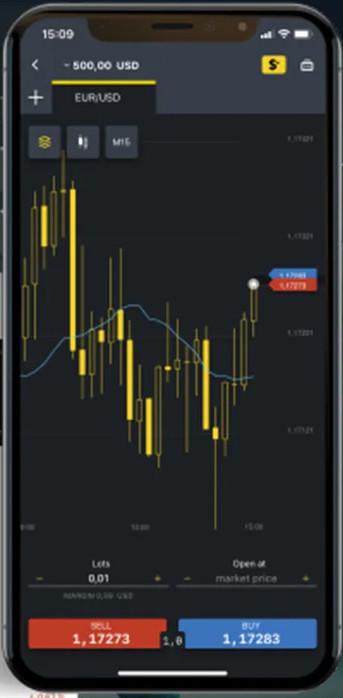
Exness offers support for the MT4 and MT5 apps, as well as its own in-house app. The Exness app allows you to manage your accounts, deposit and withdraw funds and trade on all Exness’ financial assets, but this is only available for MT5. 

Exness Trader App

We enjoyed how easy it is to use the Exness app. It has a sophisticated dashboard and intuitive home screen. It allows you to view trading signals, curated by TradingView for each instrument, which is very convenient. It also displays the market sentiment on the buy and sell buttons. Additionally, it’s simple to place orders, set price alerts, create watchlists, and view live prices and charts.

MT4 and MT5 Apps

The Exness MT4 and MT5 apps allow traders to work from anywhere, with nine timeframes, 30 indicators, and interactive currency charts. Functionality to close and modify existing orders, calculate profit/loss in real-time, and tick chart trading further empowers traders while on the move.

Trading Platform Comparison

Broker
Platform Choice
Copy Trading
Platforms
Yes
MT4
MT5
Exness Terminal
Yes
MT4
MT5
Yes
MT4
MT5
HFM Trading App

While MT4 and MT5 are both excellent trading platforms, Exness’s in-house platform is easier to use for beginner traders.

Desktop Trading Platforms

Like the mobile trading apps, Exness offers MT4, MT5, and its own in-house trading platform available on both Mac and PC.

While MT4 and MT5 are both excellent trading platforms, Exness’s in-house platform is easier to use for beginner traders. Still, the benefit of Exness offering third-party platforms such as MT4 and MT5 is that traders can take their own customised version of the platform with them should they choose to migrate to another broker.

For the purposes of this review, we tested all three platforms – Exness’s web trader platform, MT4, and MT5.  

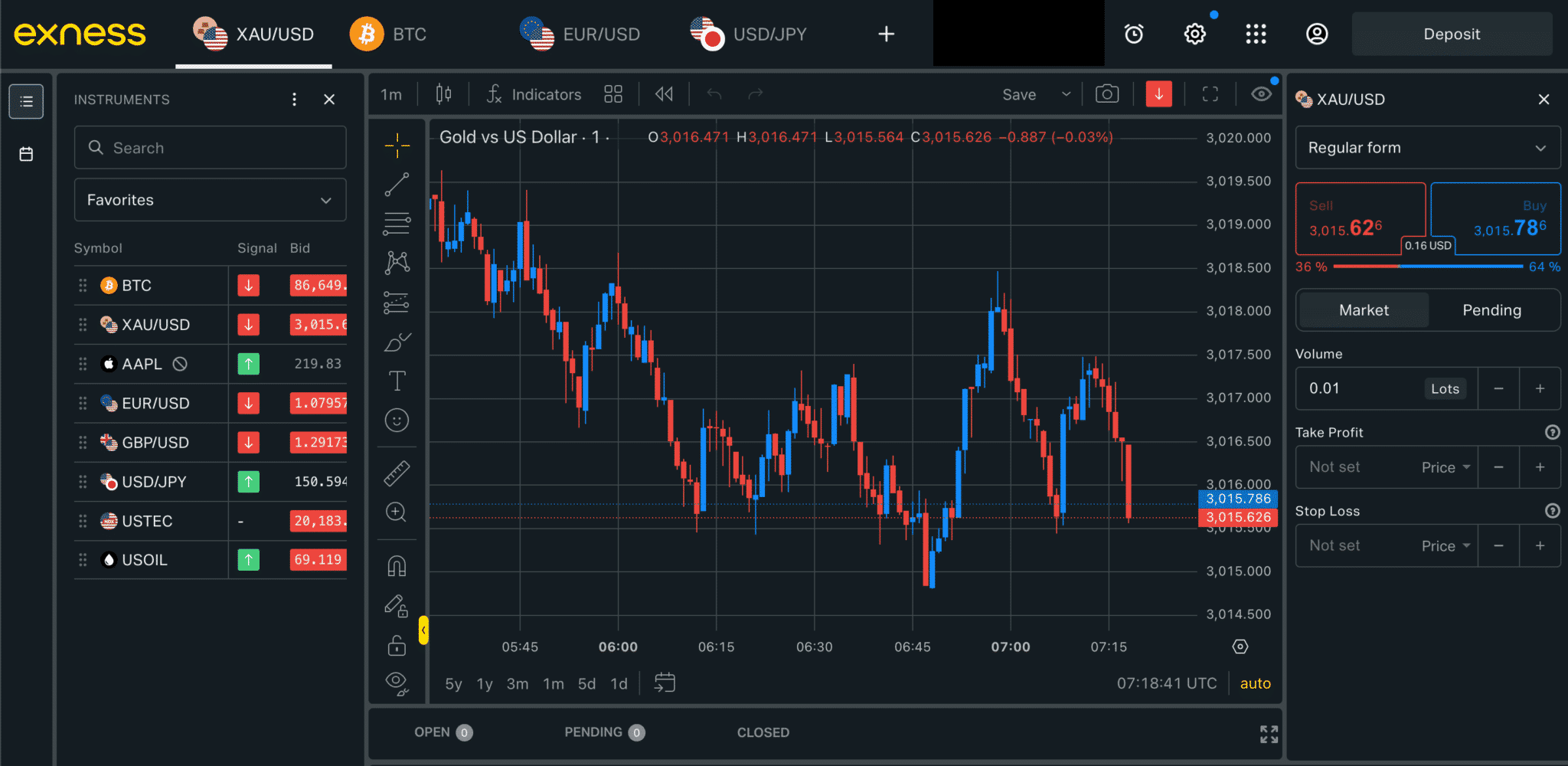
Exness Terminal

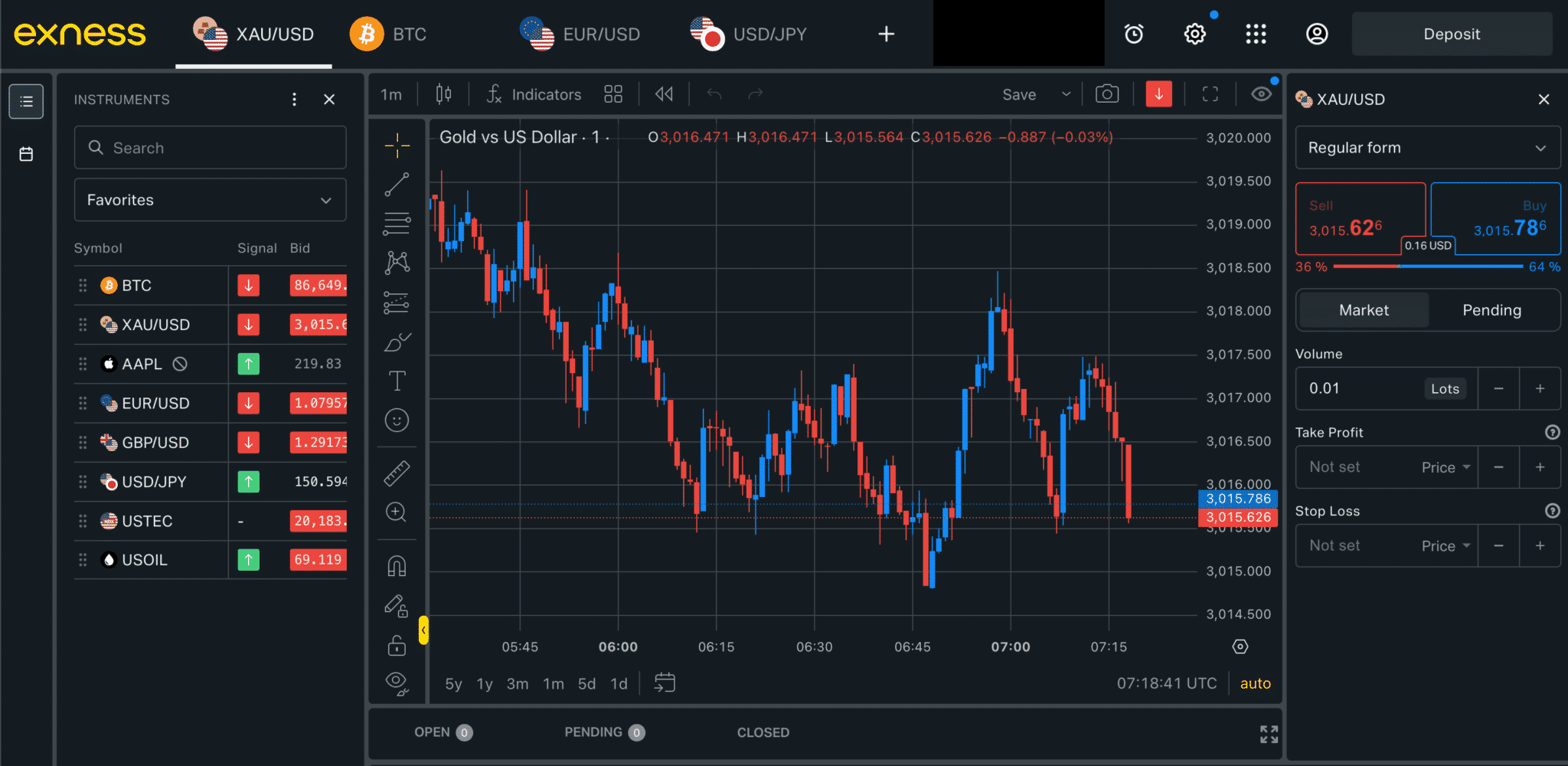
The web trader platform requires no downloads or installation and is available for all devices. When you log in to your account you are immediately redirected to the platform. We found that the web trader has a clean user interface, and it is easy to navigate and search for various instruments.

Additionally, traders can set their stop levels by percentage, account currency, or even price – which makes things much simpler for beginners. The platform also comes with TradingView charts, indicators and drawing tools, providing traders with a comprehensive view of the markets.  See below:


One drawback is that the platform does not allow traders to set price alerts and notifications, but these are available on the mobile version. We were pleased to note that TradingView, one of the most popular third-party trading tools on the market, is fully integrated into the platform and provides technical insight and instant pattern recognition.

More advanced traders may prefer MT4 or MT5, both available at Exness, which allows traders to customise their indicators, has many more chart types, and has algorithmic (or automated) trading.

Metatrader 4 (MT4)

We found that, like most brokers, the Exness MT4 platform is the standard version with 23 graphical objects and 30 built-in indicators. Unlike Exness’s proprietary web trader, algorithmic trading is available, and MT4 is fully customisable.

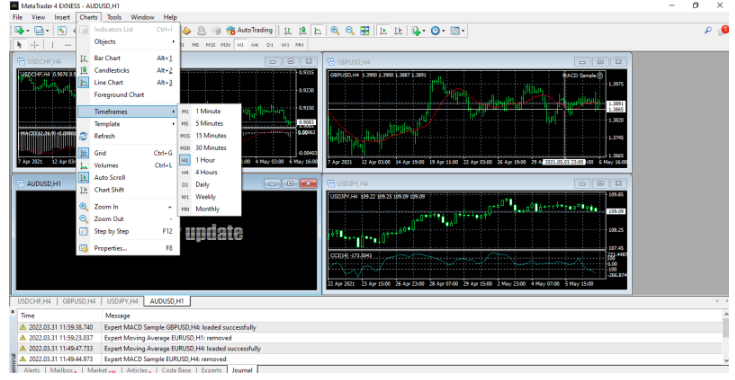
We found that the platform’s interface is dated, but it is fully customisable. There are three chart types, including Line, Bar, and Candlestick charts, and you can access a wide selection of indicators in multiple timeframes:
Metatrader 5 (MT5)

Developed in 2010, MT5 is the newer version of its predecessor, MT4, and is available at Exness. We recommend using MT5 if you are looking for a more powerful and faster trading platform when it comes to back-testing functionality for automated trading algorithms.  Additionally, traders prefer MT5 for its depth of market display, additional technical indicators (38 as opposed to 30 on MT4), and 22 analytical tools.


Primary Image
Secondary Image

Exness Deposits and Withdrawals

We were impressed by Exness’s wide range of deposit and withdrawal methods. Additionally, we were pleased that deposits and withdrawals are instant and have no fees, making funding your account (and withdrawing profits) much cheaper and easier than most other brokers.

Funding Methods

In line with Anti-Money Laundering policies, deposits and withdrawals at Exness cannot be made to/from third-party accounts, and all non-profit funds are returned to the original deposit source. 

Accepted Currencies: When we opened our account at Exness, we were given the choice of more than 40 base currencies, including AUD. Most other brokers only offer 5 – 10 base currencies, so Exness really shines on this front. This is a huge advantage for Australians who will likely have bank accounts denominated in AUD and will have the option of avoiding conversion fees.

We tested deposits and withdrawals via a Visa credit card and found that our deposit was processed almost instantly, and it took 24 hours for our withdrawal to arrive in our account. This withdrawal time is faster than the industry average.

Primary Image
Secondary Image

Exness’s Research and Trading Tools

Exness offers comprehensive research in both video and written formats and excellent trading tools, including a standard VPS service, TradingView, and Trading Central’s indicator service. 

Research Tools

Most of the research content is presented in the analysis blog, which is updated every few days with thoughtful insight into recent and future events across a range of CFD markets. Dow Jones news is also available to clients with MT4 accounts, while FXStreet is available on Exness’ web trader platform.

Of course, a standard economic calendar is available, but Exness also presents a daily video of upcoming market events to watch out for with a brief technical analysis. This is provided by Trading Central but is still useful for new traders.

TradingView

TradingView is a web-based social network that allows traders to share trading ideas, spot trading opportunities, and trade directly from its advanced charts.  It has over 12 customisable chart types, including candlesticks, Renko and Kagi, hundreds of built-in and community-built indicators, more than 50 drawing tools, volume profile indicators, and in-depth market analysis tools. Another unique feature is its customisable timeframes that can be set to any time interval and its trading alerts, available on any device, with 12 different alert conditions. 

Trading Central (TC) Indicator 

One of our favourite indicators, the TC Indicator is a multilingual and customizable plugin that superimposes Trading Central’s technical analysis strategies, forecast, commentary, and key levels (support/resistance/targets/stop pivots) onto MT4 live charts for most tradable instruments.

Based on selected timeframes, TC Indicator will display the latest Trading Central articles, whether on an intraday, short-term, or mid-term basis. Traders can program and fill in orders based on the TC Indicator levels directly from their MT4 screen.

VPS Service

Exness offers a free VPS service for all traders who deposit at least 500 USD. A Virtual Private Server (VPS) is a remote terminal solution that benefits from reduced latency and downtime, as it is unaffected by power cuts or computer crashes.  Even when the trading terminal is closed, the Exness VPS will keep trading.

Trading Tools Comparison

Broker
Economic Calendar
Autochartist
Trading Central
Trading View
Free VPS
VPS services are usually offered free with a minimum trade volume, otherwise a monthly subscription fee will apply. VPS services are usually hosted by third-party companies.
Yes
No
Yes
Yes
Yes
Yes
No
Yes
No
Yes
Yes
Yes
No
No
Yes
Primary Image
Secondary Image

Exness’s Educational Material

We found that Exness’s education is adequate for new traders but not as good as the best brokers in this space.

Videos and Webinars

Exness’s education materials comprise video tutorials and webinars. See below for more details:

Video Tutorials: Video education is available in five languages, including English, Arabic, Thai, Indonesian and Vietnamese. These bite-sized videos are great explainers of important concepts that all Forex traders need to understand.

Webinars: Exness also hosts frequent webinars in English, Arabic, Thai, Indonesian and Vietnamese. These cover various topics and will prove especially useful to new traders. Registering for a webinar does not require an Exness account, though you must provide an email address.

Education Comparison

Broker
Beginner Course
Advanced Course
Well Structured Education
Education Quality
Webinars
Yes
Yes
Yes
Medium
Yes
Yes
Yes
Yes
High
Yes
Yes
Yes
Yes
High
Yes
Primary Image
Secondary Image

Exness’s Customer Service

Notably, Exness customer service is available in English 24 hours a day and over the weekend. In addition, the help centre offers detailed and useful advice on various topics.

24/7 Customer Support

Client phone support is 24/5 in 16 languages, and 24/7 in five languages, English, Chinese, Thai, Vietnamese and Swahili. Most brokers only offer 24/5 customer service, so this is a bonus for English-speaking traders.

Other forms of contact include live chat, call-back service, phone, and emails. Support is also provided through the Exness help centre, which is frequently updated with detailed articles covering everything from trading guides to funding FAQs.

For the purposes of the review, we tested the live chat service and email. We tested Exness’s live chat and found that the customer service agents were polite and helpful.

How Brokers Are Scored

FxScouts’ Broker Score and Trust Rating constantly evolve to reflect the forex market’s dynamics. We ensure transparency by incorporating regulator data and user insights. Our in-depth reviews consider over 200 metrics across seven key categories. The radar chart to the left shows how important each category is when calculating a broker’s final score.

  • Trust Rating: Assessment of broker reliability and reputation
  • Trading Costs: Spreads and fees for clear comparisons
  • Platforms: User-friendliness and features 
  • Asset Selection: Forex, stocks, and other available instruments
  • Deposit and Withdrawal: Simple and free deposits & withdrawals
  • Education: Support for beginners and developing traders
  • Customer Support: Accessibility, responsiveness, and expertise


To ensure fairness and transparency, we independently verify broker claims and integrate real-user feedback, regulator data, and live trading tests. The radar chart to the left illustrates the weight of each category in our final scoring system.

Why Our Reviews Set the Standard

Every broker we recommend meets strict trust and safety criteria and is tested for reliability, transparency, and overall trading experience.

Exness Risk Statement

Exness Risk Statement


Trading Forex is risky, and Exness would like you to know that: “CFDs are leveraged products. Trading in CFDs carries a high level of risk and thus may not be appropriate for all investors. The investment value can both increase and decrease and the investors may lose all their invested capital.”

User Reviews

Loading reviews...

Meet the Experts Behind Our Unbiased Reviews

Chris Cammack

Partner Manager and Financial Writer

Chris Cammack
Chris Cammack is partner manager and senior financial writer at FxScouts, specialising in broker relations and forex market analysis. As the former Head of Content (2019–2024), he set editorial standards for all content published at FxScouts, including broker reviews, broker comparison pages and education. With over a decade of experience in editorial management and partner relations, Chris builds and maintains our relationships with our partners to provide the best Forex trading experience for our users. He also co-hosts the “Let’s Talk Forex” podcast with Alison Heyerdahl, where he explores trading strategies, industry news, and macroeconomic trends to help traders navigate the markets with confidence.

Alison Heyerdahl

Head of Content

Alison Heyerdahl
Alison Heyerdahl is the Head of Content at FxScouts, a Chartered Market Technician (CMT), an experienced trader, and a financial writer with extensive hands-on experience in the Forex trading industry. She specialises in Forex trading, broker analysis, and market research, with a focus on helping traders navigate the complex world of online trading safely and confidently. Alison has tested and reviewed more than 100 Forex brokers, assessing everything from regulatory status and trading conditions to platform features and customer support. Her goal is to provide honest, detailed, and practical insights that traders can rely on when choosing a broker. She’s also produced more than 300 educational videos for the FxScouts YouTube channel, where she explains trading concepts in a clear, accessible way. As the co-host of the “Let’s Talk Forex” podcast, Alison shares expert commentary on broker reliability, trading strategies, and market developments—always with a focus on transparency and trader protection.

Stefan de Clerk

Financial Writer

Stefan de Clerk
Stefan is a financial writer and Forex trading enthusiast with over a decade of experience creating in-depth content on finance and technology. His deep interest in geopolitical events, big data, and market sentiment fuels his passion for analyzing how global factors shape financial markets. With a background in marketing and financial research, Stefan believes that Forex trading offers the best insight into the pulse of the world economy. Committed to delivering well-researched, unbiased, and objective information, he helps traders navigate the markets with clarity and confidence.
1.
FP Markets
Most competitive trading costs
2.
Pepperstone
Best for scalpers
3.
AvaTrade
Best for beginners who want copy trading
4.
BlackBull Markets
Largest range of assets to choose from
5.
Fusion Markets
Best range of trading platforms
6.
IG
Best CFD Trading Account
7.
FxPro
8.
Axi
Best ECN broker on MT4 in Australia
9.
Eightcap
Best Trading Platforms

Others Also Viewed

Curious about the latest in forex? You’re not alone. Many traders and investors are digging deeper into these topics to refine their strategies and understanding. Here’s a curated selection of “others also viewed” articles, offering a range of perspectives and insights that could prove valuable for your own forex journey.

Best Forex Brokers for Beginners 2026

Good Forex brokers for beginners will help their clients get started. These are the best Forex brokers for beginners in Australia for 2026.

Lowest Spread Forex Brokers

Which broker offers the lowest spreads? We compare Forex spreads across 160+ regulated Forex brokers accepting Australian clients using the latest data.

Best Brokers for Trading VIX Volatility

Find the best brokers for trading the VIX, offering precise execution, low fees, and advanced tools to capitalise on market volatility.

Listen to our Podcast!

Let's Talk Forex

Listen to our Podcast!


Ready to have your forex knowledge amplified? Tune in to "Let's Talk Forex," a podcast designed for traders of all levels. From market analysis and trading strategies to interviews with industry experts, this podcast covers the breadth of the forex landscape. Join the conversation and discover insights that can help you navigate the exciting world of currency trading.

Polygon icon
Polygon icon